Enhanced Security
Info
Enhanced Security is a mode that affects the entire application: it turns DARCA into a controlled security system where rules and factors are enabled only where they truly reduce risk.

Why this module is needed
This module makes DARCA a maximally secure ecosystem without breaking the convenience of the core, and closes the main fraud scenarios on the market.
The market usually offers two extremes: either simple applications where security relies on a single factor or complex solutions that protect well but require constant rituals. DARCA takes a different approach.
Enhanced Security works like a “security OS” inside the bank: unified access policies, flexible confirmation factors, and risk-based responses. The module affects the entire product, because attacks affect everything as well: login, payment details, cards, P2P, RWA, token management, and withdrawals.
Note
The core idea: security must not be a separate application and must not force users to live in two worlds. It must be embedded, manageable, and predictable.

Module activation: a hard access quality threshold
Immediately after activation, the module raises access requirements: weak and compromised passwords are excluded and the device receives a local trust key.
Immediately after enabling Enhanced Security, the user is required to re-enter their password.
Then validation is applied:
- the password is checked for complexity
- the password is checked for compromise against breach datasets and external sources
If the password is weak or compromised:
- the user must change the password to a new one that meets the requirements
- or disable the security module
After successful activation, the module creates a local device key on the device. This key is stored locally and becomes the foundation of trust for the device.
Warning
The enhanced security module requires a strong password not as a formality, but because a compromised password in the financial world is a recurring loss scenario.

Flexible configuration: profiles and a rule builder
The user selects the level of strictness: from a convenient mode with notifications to a maximum mode with delays and physical factors.
The module does not impose “paranoia” on the user. It provides control over risk.
There are two configuration layers:
-
Profiles (quick selection)
- convenient: minimal friction, maximum notifications
- balanced: reinforcement only when risk is detected
- maximum: strict rules, delays, additional factors
-
Builder (fine-tuning configuration)
- geo zones and notifications
- amount and frequency limits
- confirmation rules
- delays and time-hold
- session policy and frequency of PIN/biometric prompts
Tip
This makes security personal: one user wants speed, another wants maximum protection, a third wants a “family/business” mode with shared confirmations.
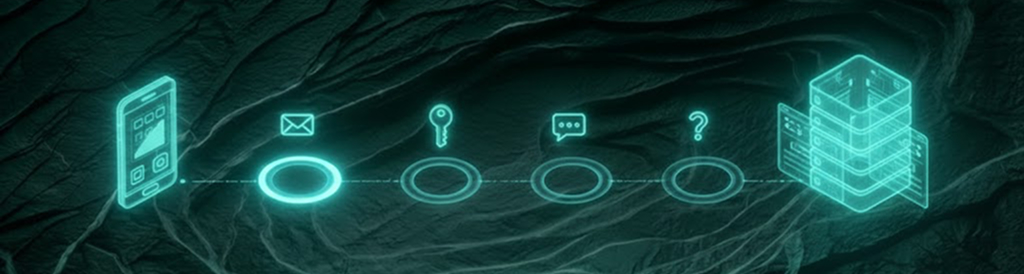
New device: enhanced authorization and protection against SIM-swap
If a login is performed on a new device without a local key, the system requests extended verification to prevent account takeover via a phone number.
If the user logs in from a new device where there is no local device key, enhanced authorization is activated. Logging in requires passing additional verification steps:
- password
- SMS code
- messenger code (if connected)
- email code (if connected)
- answers to 3 security questions (if enabled)
At the same time, single-session mode is enabled:
- as soon as a login occurs on a new device, the previous session is automatically terminated
After login:
- a notification about the new login is sent to email and messenger
- the event is recorded in the session history
Danger
SIM-swap is dangerous because an attacker tries to turn a phone number into a “master key”. Enhanced authorization makes the number just one signal, not the only access factor.

Sessions and transparency of control
The user can see where and how the account is being used and can configure the frequency of PIN or biometric requests and session lifetimes.
The module adds advanced session management:
- configuration of the request frequency for PIN or biometrics
- configuration of session lifetime
- forced reset of all sessions every N days
- session termination after a defined period of inactivity
A session history becomes available, displaying:
- device
- IP (as an available signal)
- geolocation (as an available signal)
- time and recent actions
Note
Transparency reduces the risk of an attacker’s “silent presence”: the user sees traces and reacts before damage occurs.

Geofencing and network rules
Geo and network are used as risk signals and as strict rules if the user explicitly enables a hard mode.
Geotracking with configurable settings is introduced:
- zones where authorizations are allowed (for example a city)
- zones where transactions are allowed (for example home)
- zones are defined by radius (for example “home + 5 km”) to avoid false positives
The user can enable notifications:
- when leaving an allowed zone
- when someone attempts to log in or perform an action outside the zone
IP-based rules are available as an optional strict configuration:
- for example “transactions above $100 only from a single IP”
- or “certain types of operations only from a trusted network”
Important: the system response does not have to be a hard block.
Depending on the profile and settings, different escalation steps apply:
- step-up confirmation
- delayed processing (hold)
- limiting
- blocking (if the user enabled strict mode or the risk is obvious)
Warning
Geo and network are not used as punitive measures. These are control tools that the user configures to match their lifestyle and risk tolerance.

Dynamic credentials and card protections
Credentials should not be “permanent”: addresses and CVV receive a limited lifetime, and one-time cards reduce the impact of compromise.
The module enables dynamic credentials:
-
temporary addresses for receiving cryptocurrency
-
the lifetime is configurable
-
after expiration, the address becomes inactive
-
temporary CVV on cards
-
the lifetime is configurable
-
one-time cards
-
created for a single payment
-
automatically deleted after use
Tip
This reduces the consequences of leaks: stolen credentials stop being a key to future losses.

Identity confirmation at risk
Large or unusual operations require additional identity confirmation, but the module does not “ban” the user - the action is simply not executed.
For operations that appear large or atypical, the module may request photo confirmation directly in the application.
The logic is straightforward:
- the user takes a photo
- the system compares it with the user’s reference profile
- if the confirmation fails, the operation is not executed
This is not an account lock and not a punishment. It is a step-up confirmation designed to protect against situations where the device is no longer in the owner’s possession.
Example
The phone is stolen or lost. The attacker knows the PIN or has access to the unlocked screen. When attempting a large operation, photo confirmation is triggered and the attack is stopped.

Smart delays and behavioral antifraud
If the system detects risk, it does not always block - it delays: the user gets time to stop an attack, and confirmation can be strengthened with additional factors.
The module analyzes behavior and anomalies:
- unusual amounts
- unusual transaction frequency
- suspicious recipients or changes to details
- geo/network/device conflicts
When risk is detected, transactions may:
- be placed on hold for a configurable period
- require re-confirmation at a later time
If additional factors are enabled (for example cold storage), confirmation can be accelerated.
Note
Hold logic reduces damage from “one-moment” attacks and from decisions made under pressure or in a rush.

Cold wallet as a security factor
If a cold wallet is connected, it can act as a physical factor for login and confirmation of critical actions according to user-defined rules.
If the user has connected a cold wallet, the security module allows it to be enabled as a mandatory factor:
- for account login
- for transactions at all times
- for transactions above a defined limit
- when geo rules are violated
- when antifraud detects high risk
This turns account access into a presence factor: critical actions cannot be performed remotely without the physical device.
Tip
The “maximum protection” scenario: even if an attacker obtains the password and code, without the cold wallet they will not be able to complete critical operations.

The user can add trusted people and enable joint confirmation of operations to eliminate single-point compromise.
The module allows adding additional control participants:
- view-only mode (no confirmations)
- joint confirmation mode for transactions
Confirmation models can be configured:
- 2-of-2
- 2-of-3
This is useful:
- for family scenarios
- for business and teams
- for protecting large amounts from a “single weak point”
Warning
Shared control includes recovery procedures and emergency scenarios so that access does not depend on a single person.
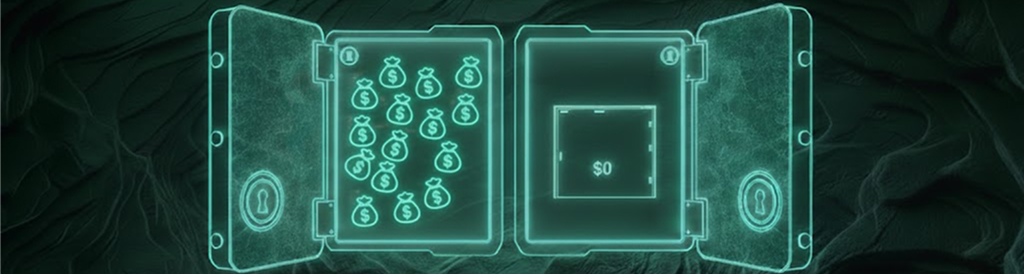
Duress Mode: coercion mode
A dedicated login mode for situations of pressure or extortion: a safe facade, silent alerts, and slowed actions to buy time for response.
Duress Mode is a secondary password or an alternative login method that is visually indistinguishable from the normal one.
The user preconfigures a “balance facade”:
- show 0
- show a balance reduced by a factor of N
- show the balance as usual
Actions in this mode are configurable:
- transactions are disabled
- or only allowed from a “decoy” account
- or transactions are sent to extended processing (hold) and execute significantly later
When entering Duress Mode:
- trusted contacts receive a notification
- trusted contacts receive event details and location data (as an available signal)
- an incident package is generated for further actions
Integrations with emergency services and data sharing are available only where legally and technically permitted.
Danger
Duress Mode creates a critical advantage: even if a person is forced to open the app, they can activate a safe scenario without increasing the risk of escalation.

Panic Lock: emergency lock
An emergency lock terminates all sessions and makes any actions impossible until the account is unlocked through an enhanced recovery procedure.
Panic Lock can be activated via:
- a panic button in the app
- official channels (chatbots/messengers, where available)
- an emergency phone number: the user calls, the system recognizes the number and enables the lock without conversation
After activation:
- all sessions are terminated
- transactions and any actions become impossible
- disabling the mode may be prohibited for a predefined period
Unlocking requires an enhanced procedure, for example:
- codes and confirmations via multiple channels
- answers to security questions
- photo verification
- identity documents and review of recent activity
- involvement of trusted contacts (if enabled)
Warning
Panic Lock is designed so that it cannot be “turned off in a minute”. It is an emergency kill switch that buys time and reduces potential damage.

Interface privacy and hidden modes
The module allows hiding specific accounts and enabling private display modes to protect the user in real-world situations.
Privacy features become available:
- hiding specific accounts from the main list
- secret gestures for quick privacy actions (for example, hiding balances)
These features do not interfere with the core and do not break the UX. They give the user control over what is visible to people nearby and reduce the risk of coercion and extortion.
Note
Privacy here is part of security. It is not meant to add complexity, but to protect the user in real-life scenarios.

Integration with other modules
Enhanced Security strengthens the entire ecosystem: it adds access rules, confirmations, and risk reactions to the most valuable and most risky operations.
-
- the security module manages access, sessions, and confirmations
- Cold Vault provides a separate storage contour
- together they create maximum protection without sacrificing core speed
-
- step-up and hold on anomalies
- protection against changes of details and large deals
- fraud reduction through policies and confirmations
-
- strengthened protection for operations with a high cost of error
- protection of documents, access rights, and confirmations
-
- protection of issuer rights and administrative actions
- prevention of management takeover
- shared confirmations for critical operations
-
- step-up and delays for withdrawals and strategy changes
- protection against attacks and impulsive decisions
Tip
The Enhanced Security module makes the ecosystem’s “dangerous” functions mass-market: users are willing to use P2P, RWA, and tokens only when they are confident that mistakes and attacks will not lead to catastrophe.

What this gives to the market and DARCA
The module reduces fraud, increases trust and retention, and for DARCA becomes a strategic differentiator and a foundation for monetization through policies and corporate modes.
For the market:
- less fraud and social engineering
- fewer user errors
- more trust in crypto and financial operations
For the user:
- risk management to suit your lifestyle
- security without the need to juggle multiple apps
- real protection scenarios: from SIM-swap to coercion
For DARCA:
- growth of trust and balances inside the ecosystem
- reduced operational losses and support load
- strong differentiation and monetization via advanced policies, subscriptions, and corporate modes
Info
Advanced Security in DARCA is not “just another 2FA”. It is a managed system that allows the ecosystem to scale without compromising between usability and protection.